

What changed for Windows 10 in October 2026?
Year one of Windows 10 ESU for businesses ended on 13 October 2026. Year two runs to 12 October 2027, and year three, the last, to 10 October 2028. Microsoft sells ESU a year at a time, the price doubles each year, and a PC joining now must pay for year one as well.
According to Microsoft, ESU gives enrolled PCs critical and important security updates only. It doesn’t bring new features, everyday bug fixes or general technical support. PCs must be on Windows 10 version 22H2, and the editions that qualify are Enterprise, Education and Pro in commercial use.
Microsoft’s own lifecycle FAQ calls ESU “a last resort” and “a temporary bridge”. StatCounter found that 13.9% of the UK desktop Windows traffic it measured in October 2026 came from Windows 10. That’s roughly one in seven.
Does a Windows 10 PC affect your Cyber Essentials certificate?
It can. Cyber Essentials requires software on in-scope devices to be licensed and supported. IASME, which delivers the scheme for the NCSC, says Windows 10 devices in scope that aren’t enrolled in ESU are unsupported and not compliant. Enrolled devices can still meet the requirement, as long as the security updates are actually applied.
The NCSC’s Cyber Essentials requirements (v3.3) give two choices for unsupported software. Remove it, or take it out of scope in a separate sub-set that prevents all traffic to or from the internet. Fixes the vendor rates as critical or high risk must be applied within 14 days of release.
Manufacturers know this tension well. In the government’s Cyber Security Breaches Survey 2025/2026, one large manufacturer said: “As a manufacturer, our machines rely on old software and that would not comply with Cyber Essentials.”
If your certificate renews within a year, check every Windows 10 device before the assessment. Read more about Cyber Essentials.
Do the PCs on your shop floor follow the same dates?
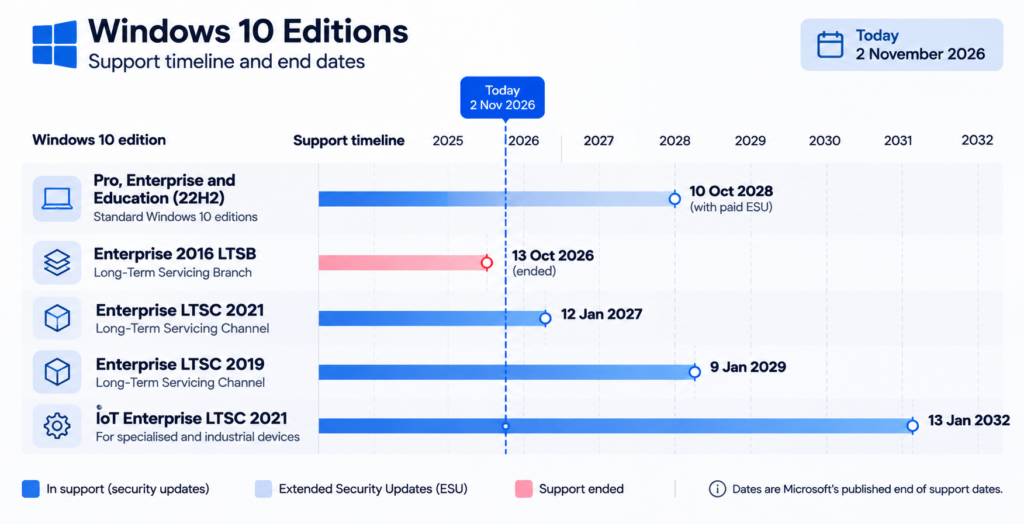
Not always. PCs that run production kit may use Long-Term Servicing Channel (LTSC) or IoT editions of Windows 10, which have their own support dates. Some are covered until 2029 or 2032. Enterprise LTSC 2021 ends in January 2027, and the 2016 edition has already run out.
| Windows 10 edition | End of support |
|---|---|
| Pro, Enterprise and Education (version 22H2) | Ended 14 October 2025. Paid ESU available up to 10 October 2028 |
| Enterprise 2016 LTSB | Ended 13 October 2026 |
| Enterprise LTSC 2021 | 12 January 2027 |
| Enterprise LTSC 2019 | 9 January 2029 |
| IoT Enterprise LTSC 2021 | 13 January 2032 |
Should you pay for year two, upgrade or replace?
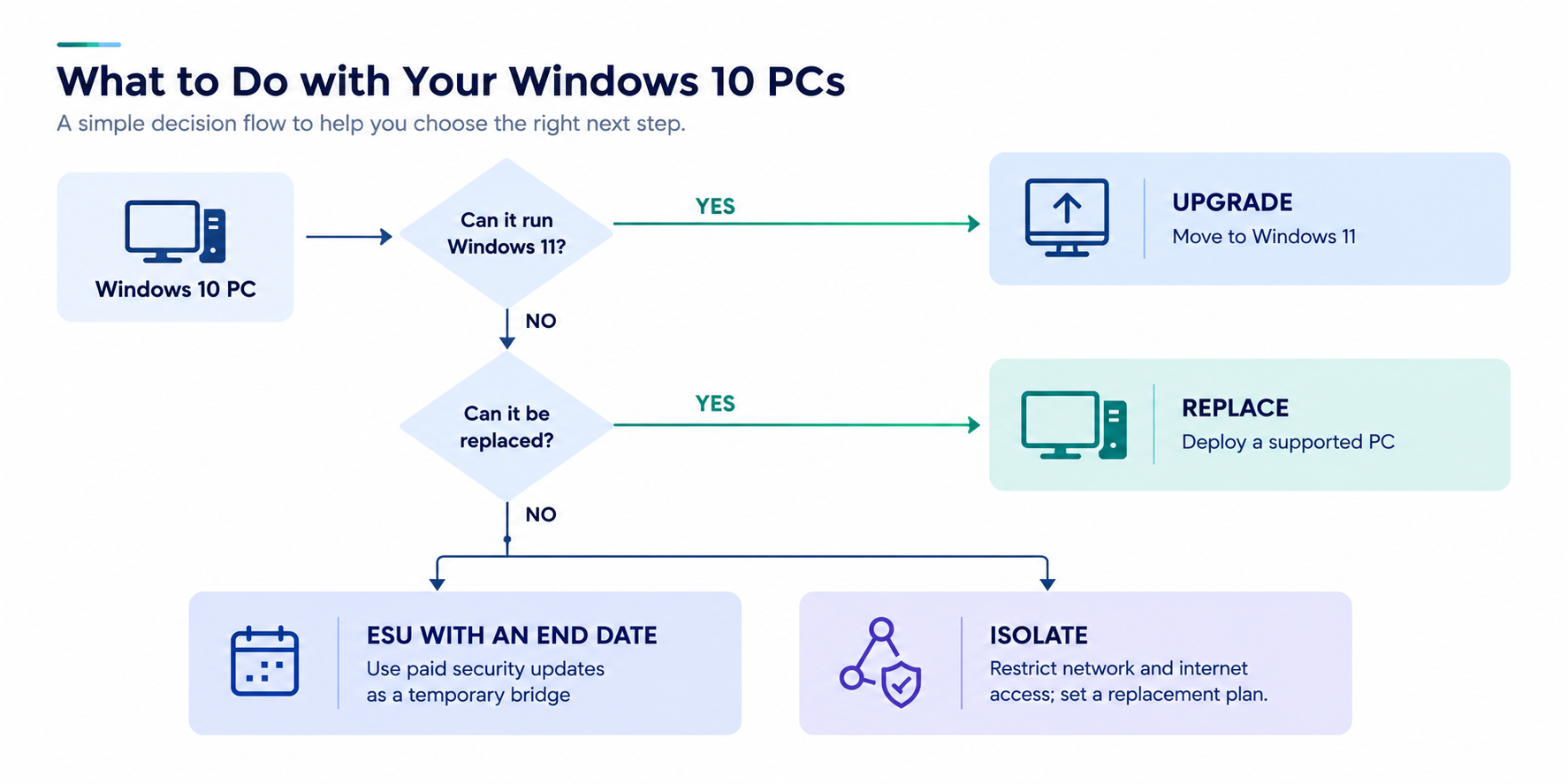
For most office PCs, upgrade or replace. Paying for ESU makes sense only for machines that genuinely can’t move yet, such as a PC tied to software that isn’t certified for Windows 11. Treat each paid year as time bought to finish the move, with a named end date, not as the plan itself.
| Option | When it fits | Watch out for |
|---|---|---|
| Upgrade to Windows 11 | The PC meets Microsoft’s requirements, including a supported processor, TPM 2.0 and Secure Boot. | Test business software, label printers and scanners first. |
| Replace the PC | The hardware can’t run Windows 11. | Lead times, set-up and moving data. See PC replacement and IT procurement. |
| Pay for ESU year two | Software or kit can’t move before October 2027. | Security fixes only; the price doubles again for year three. |
| Move the user to a cloud PC | Windows 365 or Azure Virtual Desktop suits the role. | Microsoft includes ESU for Windows 10 there, but it’s still a migration. Explore managed cloud services. |
| Isolate | Kit can’t change at all. | No internet access, a segmented network and a replacement date. |
The NCSC’s 10 Steps guidance on vulnerability management says to use supported products and plan the move before support ends. Where you can’t, it says to keep everything else on the machine updated, such as the browser and anti-malware, and separate it from the rest of the network.
One more date. Microsoft will keep giving security updates to Microsoft 365 Apps on Windows 10 until 10 October 2028, but feature updates stop at version 2608. Office still updating doesn’t mean Windows is.
Servers have their own date. Windows Server 2016 support ends on 12 January 2027, which we cover in our post on patching and tested backups.
What should you ask your IT team or provider this month?
Ask for a complete list of Windows 10 devices, including shop-floor PCs, with the edition, version and support date for each. Then ask which will be upgraded, replaced, covered by ESU or isolated, by when, and who owns each decision. If nobody can produce that list quickly, that’s your first finding.
In the same survey, 59% of medium-sized businesses (50 to 249 staff) said they keep a list of critical assets, and 56% have a policy to apply security updates within 14 days. Across all UK businesses, the figures are 29% and 34%.
Six questions worth asking
- How many Windows 10 devices do we have, and where are they?
- Which edition and version is each one on, and when does its support end?
- Which can move to Windows 11 now, and what’s stopping the rest?
- Have the PCs we’re keeping been enrolled in year two of ESU, and are the updates actually installing?
- Which devices touch production, and are they separated from the office network and the internet?
- Does our Cyber Essentials scope reflect all of this before the next renewal?
Key takeaways
- Year one of Windows 10 ESU ended on 13 October 2026. Year two runs to 12 October 2027.
- A standard Windows 10 PC with no ESU and no upgrade gets no security fixes. If it’s in scope, it won’t meet Cyber Essentials unless you remove it or move it into a separate sub-set with no internet access.
- Shop-floor PCs may run LTSC or IoT editions with different dates. Enterprise LTSC 2021 ends in January 2027.
- Use ESU only as a bridge for PCs that genuinely can’t move, with an end date.
- Start with a complete device list, and give each PC an owner and a decision.
Frequently asked questions
Will Windows 10 PCs stop working?
No. Windows 10 PCs keep running after support ends. What stops is security fixes, unless the PC is enrolled in Extended Security Updates. Unpatched flaws build up over time, and Microsoft says running Microsoft 365 Apps on an unsupported system can cause performance and reliability problems. Working isn’t the same as safe.
Can a business still join Windows 10 ESU now?
Yes. Businesses can buy Windows 10 ESU through Microsoft volume licensing, and the minimum purchase is one licence. Because ESU is cumulative, a PC joining in year two must also pay for year one. Each year is bought in full, with no partial periods, and the PC must be on version 22H2.
Do Microsoft 365 Apps still get security updates on Windows 10?
Yes, for now. Microsoft will keep providing security updates for Microsoft 365 Apps on Windows 10 until 10 October 2028, with feature updates stopping at version 2608. That covers the apps, not Windows itself, so the operating system still needs ESU or an upgrade to stay protected.
How long can a business keep Windows 10 on ESU?
Up to three years after support ended, so until 10 October 2028 at the latest. After that, Microsoft offers no more paid security updates for the standard editions. Some LTSC and IoT editions used on production equipment have their own, longer dates, so check each edition before you plan.
What should you do next?
Windows 10 isn’t a crisis for most firms, but it’s a decision that shouldn’t drift into a third paid year. Get the list, make a call on each PC, and put dates against it.
TekXera manages IT for UK businesses, including manufacturers. If you’d like to talk through your Windows 10 PCs, get in touch.