
WordPress’s own updater is being attacked: what UK businesses should check this week
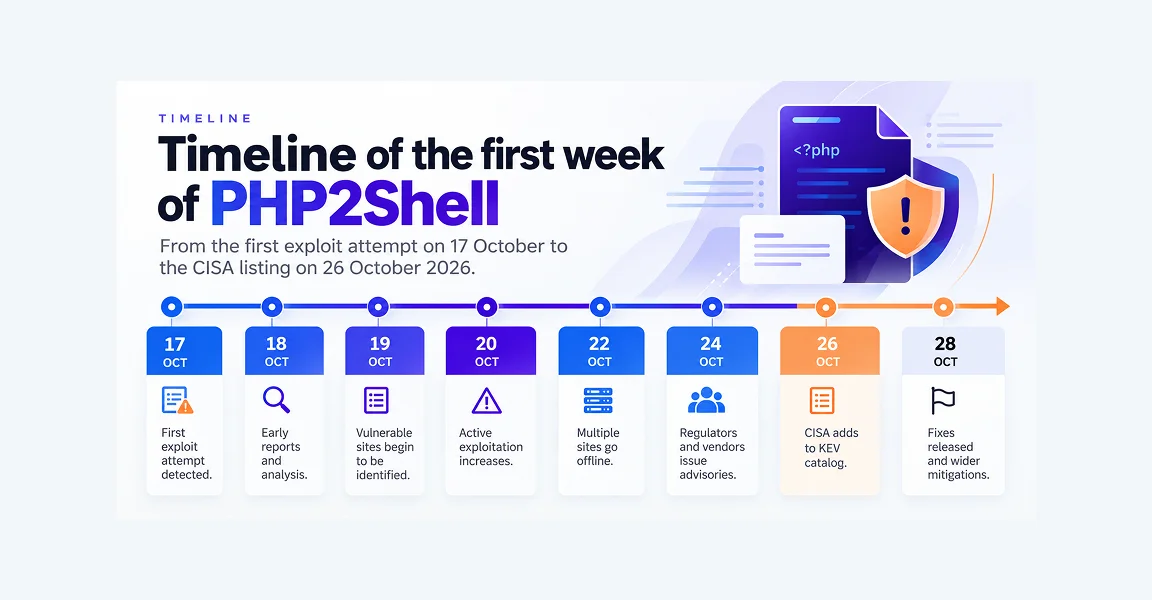
A flaw in WordPress’s own update process, CVE-2026-119977, is being exploited. It lets an attacker with no login run code on your web server during the few seconds a full core update is running. The fix is WordPress 7.1.4, released on 28 October 2026, or the matching release for older branches.
What is CVE-2026-119977?
It’s a timing flaw in how WordPress updates itself. During a full core update, WordPress unpacks a copy of itself, installer included, into the wp-content/upgrade/ folder. An attacker who reaches that folder at the right moment can run code on the server. No account is needed. It affects every branch from 4.7 onwards until that branch gets its fix, up to and including 7.1.3.
WordPress released 7.1.4 on 28 October as a security release with fixes for multiple issues, and recommended updating immediately. The first item on its list is “a weakness in the WordPress upgrade process which can lead to remote code execution during the upgrade window”.
The window is short. Belgium’s national cyber security centre, the CCB, cites Wordfence as saying it can be “down to seconds”. That’s why, in the CCB’s words, “attackers are continuously scanning WordPress sites in the hope of striking at the right moment”.
Is it actually being exploited?
Yes. The US Cybersecurity and Infrastructure Security Agency (CISA) added it to its Known Exploited Vulnerabilities catalogue on 3 November, “based on evidence of active exploitation”. The CCB also lists it as actively exploited. As of 4 November, we haven’t seen a named UK victim reported.
The Hacker News reports that Wordfence recorded more than 18,500 requests aimed at the staged installer in the first 21 hours after disclosure. It also reports honeypot attempts on 30 October from an IP address located in the UK.
WordPress itself rates the issue Low, while Wordfence, which assigned the CVE, scores it 8.1 (High) because the end result is code on your server. Rescana’s write-up sets out both ratings. Plan around the exploitation, not the label.
Why is updating risky this time?
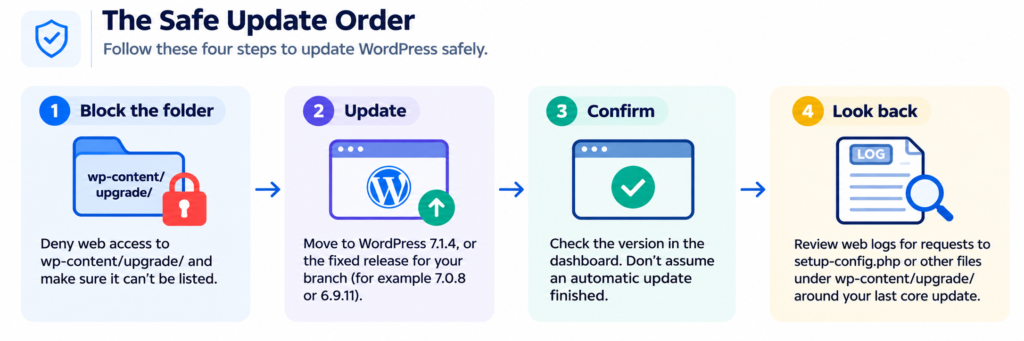
- Block the folder. Ask whoever runs your web server to deny web access to
wp-content/upgrade/and make sure it can’t be listed. WordPress only needs file access to it, not web access. - Update. Move to 7.1.4, or the fixed release for your branch (for example 7.0.8 or 6.9.11). WordPress only actively supports the latest version, so 7.1.4 is the safest target. Versions older than 4.7 aren’t affected by this flaw, but they get no security fixes at all and need upgrading anyway.
- Confirm. Check the version in the dashboard. Don’t assume an automatic update finished.
- Look back. Review web logs for requests to
setup-config.phpor other files underwp-content/upgrade/around the time of your last core update.
The CCB adds a point that’s easy to miss: updating “does not remediate historic compromise”. If someone got in during an earlier update, the patch won’t remove them.
Who should worry most?
Any business whose website runs on WordPress and is looked after by nobody in particular. The site was built by an agency years ago, hosting is on a card, and updates happen when someone remembers. The risk isn’t only defacement. Code on the web server can reach the database, contact forms and any connected systems.
Manufacturersare a good example. A website might hold a product catalogue, a distributor login, quote requests with drawings attached, or a link into stock or order systems. None of that is the factory floor, but it’s often the first thing an attacker sees.
Your hosting company keeps the server running. Your web agency built the site. Neither may be contracted to patch WordPress core, check logs or respond if something looks wrong. Find out who is.
Does this affect Cyber Essentials?
It can. If the server running your site is in your Cyber Essentials scope, the NCSC’s requirements (v3.3) say fixes for vulnerabilities with a CVSS v3 score of 7 or above, or rated critical or high risk by the vendor, must be installed within 14 days of release.
Wordfence’s score of 8.1 puts this flaw over that line, even though WordPress rates it Low. Counting from 28 October, 14 days runs to 11 November. If your site is on shared hosting or a managed platform, check with your assessor whether it’s in scope at all.
Fixing within 14 days is less common than it should be. In the government’s Cyber Security Breaches Survey 2025/2026, 34% of UK businesses said they have a policy to apply security updates within 14 days. Among medium-sized businesses, the figure was 56%.
What should you ask your web provider this week?
Ask four things: which WordPress version every site you own is running, whether wp-content/upgrade/ is blocked from the web, whether anyone has checked the logs from the last core update, and who is responsible if something is found. If nobody can answer in a day, that’s the real finding.
Don’t forget the sites you’ve lost track of. Old campaign microsites, a staging copy, a careers site or a regional site built by a different agency are often the ones still on an old version. The NCSC’s 10 Steps to Cyber Security make asset management one of the ten, and websites belong on that list.
A short checklist for the conversation:
| Question | Good answer |
|---|---|
| What version is each site on? | 7.1.4, or the fixed release for its branch, confirmed in the dashboard |
Is wp-content/upgrade/ blocked from the web? | Yes, at the web server, and it can’t be listed |
| Have the logs been checked? | Yes, around the last core update, with nothing unexplained |
| Who patches WordPress core? | A named person or provider, in writing |
| What happens if a site is compromised? | A plan that covers taking it offline, restoring and telling customers if data was involved |
Key takeaways
- CVE-2026-119977 lets an attacker with no login run code during a WordPress core update. It’s being exploited.
- The fix is WordPress 7.1.4 (28 October 2026) or the fixed release for your branch.
- Block web access to
wp-content/upgrade/before you update, because the last update runs the old code. - Check logs from earlier updates. Patching doesn’t remove an attacker who’s already in.
- Make sure someone is actually responsible for patching your website, not just hosting it.
FAQ
Is my WordPress site vulnerable to CVE-2026-119977?
It is if it runs WordPress 4.7 or later and hasn’t moved to the fixed release for its branch. Version 7.1.4 fixes it, as do backported releases such as 7.0.8 and 6.9.11. Versions older than 4.7 aren’t affected by this flaw, but they get no security fixes at all and need upgrading anyway. The risk applies during full core updates, which is when attackers try to strike.
Do WordPress plugins protect against it?
Not reliably. The attack happens inside WordPress’s own update process, in a folder that sits outside the normal site, so a security plugin may not see it. The dependable steps are at the web server: block web access to wp-content/upgrade/, update to the fixed release and review the server logs.
My site updated automatically. Am I safe?
Probably, but check. Confirm the version in the dashboard rather than assuming the update finished. Then review your logs for requests to files under wp-content/upgrade/ around that update, because the last update ran the old, vulnerable code. Patching protects you from now on but won’t remove anyone already in.
Is there a UK deadline for fixing it?
There’s no UK legal deadline. CISA’s 6 November date applies only to US federal agencies. If the server running your site is in your Cyber Essentials scope, the scheme requires high-risk fixes within 14 days of release, which for 7.1.4 means by 11 November. Otherwise, treat it as urgent because it’s being exploited.
What should you do next?
This isn’t a reason to abandon WordPress. It’s a reminder that a website is a server on the internet, and somebody needs to own its updates and its logs. Check your version, block the folder, look back at your last update and name an owner.
TekXera provides managed IT and cyber security for UK businesses, including manufacturers. If you’d like a second pair of eyes on your website set-up,get in touch.